Three tools draw C4 diagrams from text, and picking between them looks like a taste question about syntax. It is mostly a question about what you want to keep: a picture, or a model that can produce pictures.
Everything below was run on one system modeled three ways, with Structurizr 2026.09.19 (structurizr-* 6.2.3), Mermaid CLI 11.17.0 on mermaid 11.17.2, and PlantUML 1.2026.8 on Graphviz 16.1.0.
The short answer
These are not three competitors for one slot. Structurizr exports PlantUML and Mermaid, so the real choice is whether you keep a model upstream of whichever renderer you already use.
The contenders
Structurizr is a DSL and tooling built by the author of the C4 model. You define people, systems, containers, and relationships once, then declare views over that model. It does not draw anything itself: it exports to other formats.
Mermaid is a JavaScript diagram renderer with native C4 keywords (C4Context, C4Container, C4Component, C4Dynamic, C4Deployment). GitHub, GitLab, and most static site generators render Mermaid fences without a plugin. Its own documentation still carries a caveat at the top of the C4 page:
C4 Diagram: This is an experimental diagram for now. The syntax and properties can change in future releases. Proper documentation will be provided when the syntax is stable.
The C4 keywords work, and the renders below are real output, but the syntax carries no stability promise.
PlantUML with the C4-PlantUML macro library gives you C4 shapes on top of Graphviz layout. It needs Java and Graphviz, and it renders to PNG or SVG.
The same system, three ways
Here is a small system: a Hugo build that syncs to S3, CloudFront in front of it, and a reader arriving from search.
The Structurizr DSL describes the model and then two views over it:
workspace "Personal Site" {
    model {
        reader = person "Reader" "Wants to fix an SSH error"
        search = softwareSystem "Google Search" "Sends organic traffic" "External"

        site = softwareSystem "Personal Site" {
            hugo   = container "Hugo Build"    "Renders Markdown into static HTML" "Go"
            bucket = container "Origin Bucket" "Stores the rendered site"          "S3"
            cdn    = container "Edge"          "Serves pages and applies 301 redirects" "CloudFront"

            cdn -> bucket "Fetches objects" "HTTPS"
            hugo -> bucket "Syncs output" "aws s3 sync"
        }

        reader -> cdn "Reads posts" "HTTPS"
        search -> reader "Refers"
    }

    views {
        systemContext site "Context" {
            include *
            autolayout tb
        }
        container site "Containers" {
            include *
            autolayout tb
        }
        theme default
    }
}
The view bodies need their own lines. Collapsing one to systemContext site "Context" { include *; autolayout tb } fails with Too many tokens, expected: systemContext <software system identifier> [key] [description] {.
The Mermaid version describes one diagram:
C4Container
    title Container diagram for Personal Site

    Person(reader, "Reader", "Wants to fix an SSH error")
    System_Boundary(site, "Personal Site") {
        Container(hugo, "Hugo Build", "Go", "Renders Markdown into static HTML")
        Container(bucket, "Origin Bucket", "S3", "Stores the rendered site")
        Container(cdn, "Edge", "CloudFront", "Serves pages and applies 301 redirects")
    }
    System_Ext(search, "Google Search", "Sends organic traffic")

    Rel(reader, cdn, "Reads posts", "HTTPS")
    Rel(cdn, bucket, "Fetches objects", "HTTPS")
    Rel(hugo, bucket, "Syncs output", "aws s3 sync")
    Rel(search, reader, "Refers")
The C4-PlantUML version is nearly the same text with a different preamble:
@startuml container
!include https://raw.githubusercontent.com/plantuml-stdlib/C4-PlantUML/master/C4_Container.puml

Person(reader, "Reader", "Wants to fix an SSH error")
System_Boundary(site, "Personal Site") {
  Container(hugo, "Hugo Build", "Go", "Renders Markdown into static HTML")
  ...
Three files, roughly the same length, describing the same boxes. The differences show up when you render them.
Where they differ
Layout is the biggest gap
Mermaid places C4 shapes on a grid in declaration order and draws straight lines between them. It does not route edges around anything. This is the Mermaid source above, rendered live:
The “Reads posts” arrow from Reader to Edge runs straight through Hugo Build, and its label lands on top of the box. Nothing is wrong with the source; that is the layout engine.
PlantUML hands identical semantics to Graphviz. This is its own output, rendered by Graphviz and captured as an image, because Mermaid cannot run the C4-PlantUML macros:
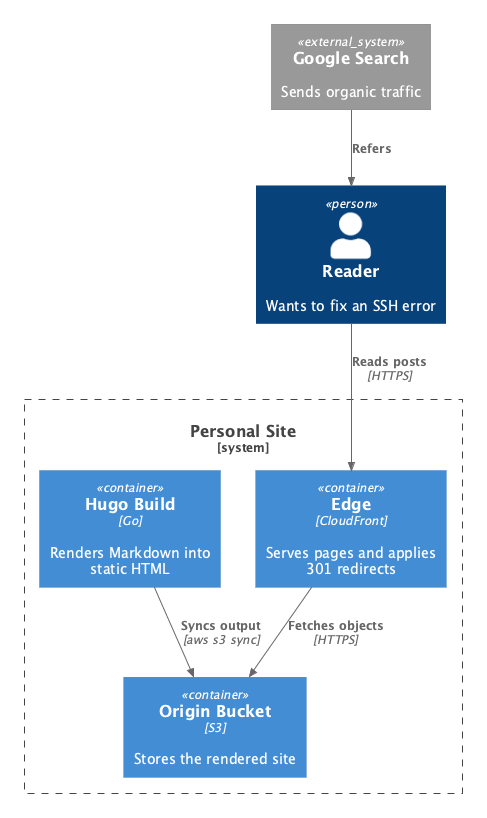
No crossings, no overlaps, and no label sitting on a box. Rendered to files by the two command line tools and trimmed of whitespace, the diagrams come out close in size, so compactness is not the difference. Readability is.
Mermaid’s only C4 layout control is UpdateLayoutConfig, which sets shapes per row. On this diagram $c4ShapeInRow="2" produced a file byte-identical to the default, and $c4ShapeInRow="1" made things worse: the same arrow then crossed three boxes instead of one. It moves boxes around. It cannot route a line.
Only two of the three catch a typo
Rename bucket to buckett in one relationship and the tools diverge sharply.
Structurizr refuses the workspace and names the line:
ERROR com.structurizr.command.ValidateCommand -- The destination element "buckett"
does not exist at line 11 of /work/typo.dsl: cdn -> buckett "Fetches objects" "HTTPS"
Mermaid also refuses, and exits non-zero:
Error: C4 rel "cdn" -> "buckett" references an unknown shapePlantUML exits 0 and renders this:
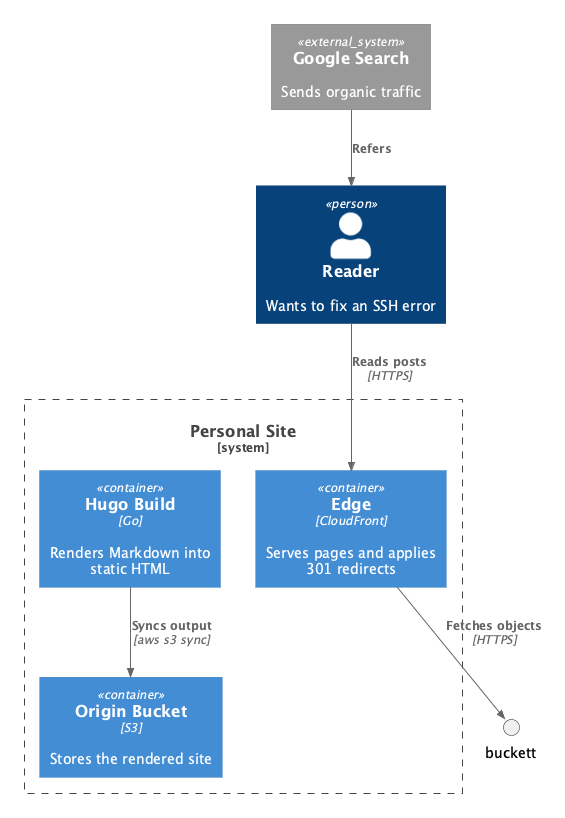
It invented an element. A stray circle outside the boundary is easy to miss in review, and the diagram ships looking authoritative. If C4-PlantUML is in your pipeline, that is the argument for a model layer above it.
PlantUML has two kinds of include, and the popular one needs a network
Most C4-PlantUML tutorials start with a URL:
!include https://raw.githubusercontent.com/plantuml-stdlib/C4-PlantUML/master/C4_Container.pumlWhen that URL cannot be fetched, PlantUML exits 200 and still writes a PNG, one containing the error text instead of your diagram:
issue raw.githubusercontent.com java.util.concurrent.ExecutionException:
java.io.IOException: HTTP error 404 with 404: Not Found
Error line 2 in file: broken.puml
Some diagram description contains errors
A CI job that renders diagrams and does not check the exit code will publish that image. The angle-bracket form pulls from the standard library shipped inside plantuml.jar under stdlib/c4/, so it needs no network at all:
!include <C4/C4_Container>That is the form Structurizr generates. Prefer it.
One more PlantUML quirk worth knowing: the name in @startuml container decides the output filename, not the name of the source file. Two .puml files that both open with @startuml container overwrite each other’s PNG.
One model, every view
The 30-line DSL above produced four files from a single command run twice:
structurizr export -w workspace.dsl -f plantuml/c4plantuml -o out-puml
structurizr export -w workspace.dsl -f mermaid -o out-mmd
out-puml/structurizr-Context.puml out-mmd/structurizr-Context.mmd
out-puml/structurizr-Containers.puml out-mmd/structurizr-Containers.mmdTwo views, two formats, 91 generated lines, all derived. Renaming a container is one edit. Hand-written Mermaid and PlantUML cost about 15 lines per diagram, and each diagram is a separate thing to keep in step with the code and with every other diagram.
Structurizr does not trust Mermaid’s C4 syntax
Given -f mermaid, Structurizr does not emit C4Container. It emits a plain flowchart with inline styling:
graph TB
  subgraph diagram ["Container View: Personal Site"]
    1["<div style='font-weight: bold'>Reader</div>..."]
    ...
The C4 model’s own tooling routes around Mermaid’s C4 keywords and uses graph TB, which gets Mermaid’s mature flowchart layout instead of its C4 grid. If you want C4 shapes out of Mermaid, that is a useful signal about which code path is better tested.
Where each one renders
Mermaid wins on reach and wins decisively. A fenced mermaid block renders in GitHub and GitLab Markdown, in most wikis, and in static site generators, with nothing installed. PlantUML needs Java and Graphviz, or a server to render against. Structurizr needs a JVM or its Docker image, and produces text for one of the other two.
Two Structurizr notes before you adopt it
The structurizr/cli Docker image now prints a deprecation banner on every run:
Structurizr CLI will not receive any further updates - please migrate to the new
consolidated tooling for new features, bug fixes, and security updates
The replacement is the structurizr/structurizr image, which carries export, validate, inspect, local, and server as subcommands of one tool. Use that one.
The consolidation is wider than the CLI. Structurizr’s [end of life page][structurizr-eol] lists four products being retired: the CLI (replaced by the new commands), Structurizr Lite (replaced by local), the on-premises installation (replaced by server), and the hosted cloud service, which is marked “no replacement” and reaches EOL on 30 September 2026. If a guide tells you to run Structurizr Lite, it predates this.
The tooling also warns while exporting:
WARN com.structurizr.view.Configuration -- The Structurizr cloud service will reach
its End of Life (EOL) on 30 September 2026 and this theme will not be available
That fires on any theme URL under static.structurizr.com, which is what a bare theme default in a workspace resolves to. The endpoint still serves today, and no separate announcement covers the theme CDN, so this is Structurizr telling you where it expects its own hosting to go. Vendor the themes you depend on rather than finding out.
The DSL, the exporters, and the rendering commands are open source and unaffected by any of this.
Trade-offs
Structurizr
- One model produces every view, so a rename is one edit
- Validates references and reports the offending line
- Exports to both PlantUML and Mermaid, so it sits above the choice
- Built by the author of C4, and tracks the model closely
- Another tool in the chain, with a JVM or Docker behind it
- Draws nothing itself; you still need a renderer
- Mid-consolidation: the CLI, Lite, on-premises, and the cloud service are all being retired at once
- The DSL is a concept to learn before the first diagram appears
Mermaid
- Renders in GitHub, GitLab, wikis, and static sites with nothing installed
- Rejects relationships that reference an unknown shape, and exits non-zero
- All five C4 diagram types are supported keywords
- The diagram lives in the same file as the prose about it
- No edge routing: arrows cross boxes and labels overlap them
- Layout control is limited to shapes per row
- One file is one diagram, with no shared model
- Structurizr’s own exporter avoids the C4 syntax in favor of
graph TB
PlantUML
- Graphviz layout, which is the best-looking output of the three
- The C4 macros ship inside the jar, so
<C4/C4_Container>renders offline - Mature, with a long history and wide editor support
- Renders an invented element for a typo, and exits 0
- The include style most tutorials use needs a network, and fails into an error image
- Needs Java and Graphviz, so it does not render in a README
@startuml <name>controls the output filename, which silently collides
Pick by the job
<C4/...> includes and an exit-code check in CI.Related Content
- Structurizr Examples is the hands-on version of the DSL above, with rendered diagrams at each C4 level.
- Learn Mermaid covers the diagram types beyond C4, where its layout is much stronger.
References
- The C4 model, for the notation itself.
- Structurizr documentation and the consolidated tooling repository.
- Mermaid C4 syntax, for the keywords and
UpdateLayoutConfig. - C4-PlantUML, for the macro library and its include options.
Comments #